








If you’ve ever juggled two computers at the same desk — a gaming PC and a work laptop, for instance — you already know the cable-swapping nightmare. Unplug the monitor, swap the HDMI cable, move the USB dongle, rearrange your desktop icons (again), and repeat every single time you switch machines. It’s tedious, it wears out your connectors, and it kills your productivity.
That’s exactly the problem TESmart set out to solve. Founded in 2013 and headquartered in Shenzhen, China, TESmart has become one of the most recognized names in KVM (Keyboard, Video, Mouse) switches, offering a product lineup that spans everything from basic two-computer setups to enterprise-grade multi-monitor configurations. Whether you’re a competitive gamer running dual PCs, a hybrid worker bouncing between a laptop and desktop, or an IT professional managing a server rack, TESmart has a switch designed for your workflow.
In this comprehensive review, we’ll break down TESmart’s top KVM switches, compare their specs side by side, and help you figure out exactly which model fits your setup. We’ve tested these switches hands-on across multiple configurations — dual-PC gaming setups, laptop-plus-desktop hybrid workstations, and multi-monitor professional environments — to give you an honest, experience-driven assessment.
But first — what exactly is a KVM switch, and why does it matter so much in 2026? A KVM (Keyboard, Video, Mouse) switch is a hardware device that lets you control multiple computers from a single set of peripherals. Think of it as a smart hub for your desk: plug in your keyboard, mouse, monitor(s), and any other USB devices once, then connect as many computers as you need. Press a button or tap a hotkey, and you’re instantly working on a different machine — no cable swapping, no display reconfiguration, no desktop icons scattering across your monitors.
In the era of hybrid work, where many professionals maintain separate work and personal machines on the same desk, a quality KVM switch isn’t a luxury — it’s a productivity essential. And with gamers increasingly running dual-PC streaming setups (one for gaming, one for encoding and chat), the demand for KVMs that can handle high refresh rates without degrading signal quality has never been higher.
Browse TESmart’s full lineup here →
Why TESmart Stands Out in the KVM Market
Before we dive into individual products, let’s look at why TESmart has earned consistently high ratings — 4.7 out of 5 stars on Amazon across 10,000+ reviews and 4.8 on their own site — from users and professional reviewers alike.
1. EDID Emulation Across the Board
This is the single biggest reason to choose TESmart over cheaper alternatives — and it’s a feature that many buyers overlook until they experience the problem firsthand. EDID (Extended Display Identification Data) is a VESA-defined standard that tells your computer what monitor is connected and what resolutions, refresh rates, color depth, and HDR capabilities it supports. Without EDID emulation, every time you switch computers through a KVM, your system thinks the monitor was physically unplugged — causing window rearrangement, refresh rate resets to 60Hz, HDR disabling, and sometimes full black screens that require a restart.
If you’ve ever used a budget KVM and wondered why your 144Hz gaming monitor suddenly drops to 60Hz every time you switch machines, that’s the EDID problem. Your GPU forgets what the monitor supports and falls back to a default resolution. It’s frustrating, and it’s the most common complaint we hear about budget KVM switches.
In our testing, TESmart’s EDID implementation works exactly as it should: display capabilities remain visible to the GPU at all times, monitors come back to life almost instantly when switching back, and your whole desktop layout stays exactly as you left it — no icons rearranging themselves, no resolution resets. This feature alone is worth the premium over budget KVMs.
2. Support for the Latest Video Standards
While many KVM brands still max out at HDMI 2.0 and 4K@60Hz, TESmart’s latest generation supports DisplayPort 1.4, HDMI 2.1, 8K@60Hz, and 4K@144Hz — a critical advantage for gamers and creative professionals who need high refresh rates and pristine image quality.
3. All-Inclusive Cable Bundles
Unlike competitors that nickel-and-dime you on cables, every TESmart KVM ships with all necessary DisplayPort, HDMI, USB, and power cables included. This can save you $50–$100 compared to brands where adapters are sold separately.
4. Sturdy Build Quality
One of the first things you notice when unboxing a TESmart KVM is the solid feel. The metal body provides a much more robust and durable feel than other KVM switches on the market with plastic housings. Premium models feature powder-coated steel chassis with brushed aluminum front panels that look right at home on a professional desk setup.
5. Multiple Switching Methods
Every TESmart KVM supports at least three switching methods: front-panel button, infrared remote control, and keyboard hotkeys. Some models also support mouse gesture switching. This flexibility means you can switch PCs without ever taking your hands off the keyboard.
Ready to simplify your desk? Explore TESmart KVM switches →
TESmart DKS202-M24 — Dual 8K@60Hz DisplayPort 1.4 KVM Switch

The DKS202-M24 is TESmart’s flagship gaming KVM and arguably the most capable 2PC/2-monitor switch in its price class. Built around DisplayPort 1.4, it supports resolutions up to 8K@60Hz and 4K@240Hz, with full Variable Refresh Rate (VRR), G-SYNC, and FreeSync passthrough. If you’re running a dual-PC streaming or gaming-plus-workstation setup with high-refresh monitors, this is the model to beat.
We tested this switch in our own dual-PC setup for several weeks — switching between a gaming rig running FPS titles at 144Hz and a secondary workstation used for video editing — and came away genuinely impressed. The switching speed is excellent, and thanks to the EDID emulation, we never experienced a single resolution reset or refresh rate drop. Moving between gaming and editing workflows felt seamless every time.
Key Specifications
- Computers: 2 PCs
- Monitors: 2 (DisplayPort 1.4)
- Max Resolution: 8K@60Hz / 4K@240Hz / 4K@144Hz
- VRR Support: G-SYNC, FreeSync, Adaptive Sync
- USB Ports: 2× USB 3.0 (5Gbps), dedicated keyboard/mouse ports
- Ethernet: Built-in 1Gb/s
- EDID Emulation: Yes
- Color Depth: 12-bit
- Power Consumption: ~3W idle, ~7–8W active
Pros
- Exceptional switching speed with zero resolution resets
- True 8K@60Hz and 4K@240Hz support — rare at this price point
- Full G-SYNC/FreeSync passthrough for gaming
- Low power consumption suitable for 24/7 operation
- USB 3.0 transfer speeds match direct computer connections
Cons
- Ethernet limited to 1Gb/s (not 2.5Gb/s)
- No USB-C port with power delivery
- Included cable lengths are inconsistent between USB and DisplayPort
Price: $329.90 — Check the DKS202-M24 latest price →
TESmart HDK202-M24 — HDMI 2.1 & DP 1.4 Dual 4K@144Hz Gaming KVM

If you have a mixed setup — say a gaming PC with DisplayPort and a work laptop with HDMI — the HDK202-M24 is purpose-built for you. It’s the only TESmart model that supports both HDMI 2.1 and DisplayPort 1.4 simultaneously, with an ADI chip that handles VRR, FVA (Fast VSync Adjustment), ALLM (Auto Low Latency Mode), and Dynamic HDR across both interfaces.
This dual-standard compatibility makes it ideal for mixed environments where you might have a high-refresh DisplayPort gaming monitor alongside an HDMI-connected ultrawide. According to TESmart’s own blog, the HDK202-M24 is “designed for users who demand more than basic switching — PC gamers using 144Hz+ dual-monitor setups, content creators working with color-critical software, and hybrid workers switching between work and personal systems.”
Key Specifications
- Computers: 2 PCs
- Monitors: 2 (HDMI 2.1 + DisplayPort 1.4)
- Max Resolution: 8K@60Hz / 4K@144Hz
- Gaming Features: VRR, FVA, ALLM, Dynamic HDR
- Chipset: ADI chip for signal integrity
- EDID Emulation: Yes
- USB: USB 3.2 Gen 1 (5Gbps)
- Ethernet: Built-in Gigabit
Pros
- Dual HDMI 2.1 + DisplayPort 1.4 support — unmatched flexibility
- Full VRR and Dynamic HDR passthrough for gaming
- ADI chip ensures clean signal integrity at high refresh rates
- EDID emulation prevents any display resets
Cons
- Premium pricing over single-interface models
- Best suited for dual-monitor setups only
Price: $359.00 — Check the HDK202-M24 latest price →
TESmart HDC202-X24 — Thunderbolt 4 KVM Dock
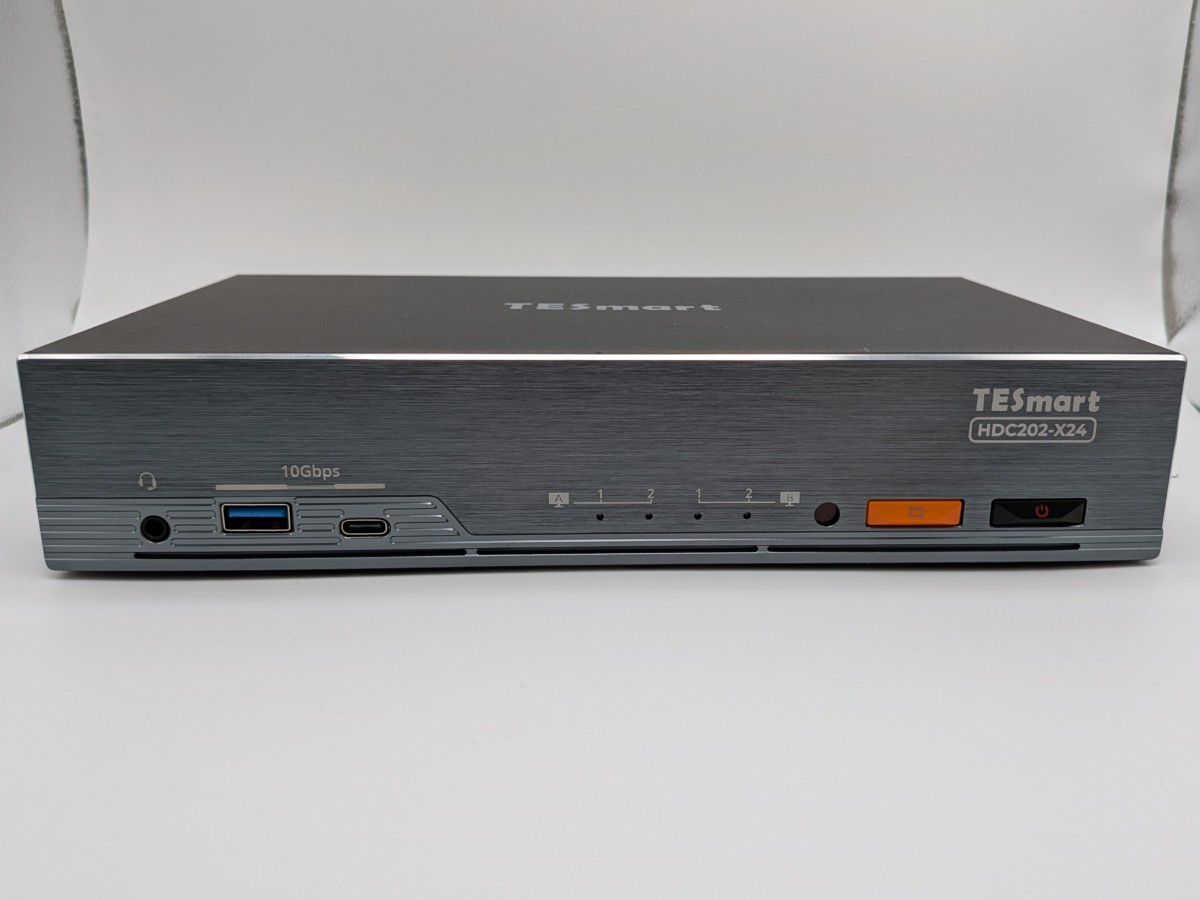
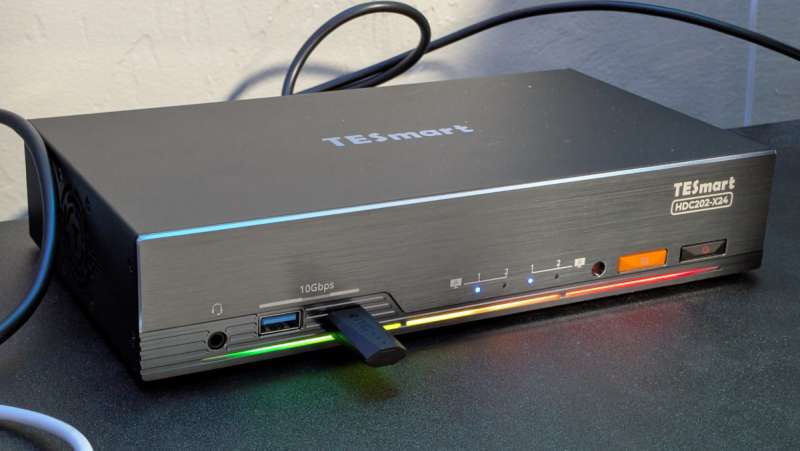
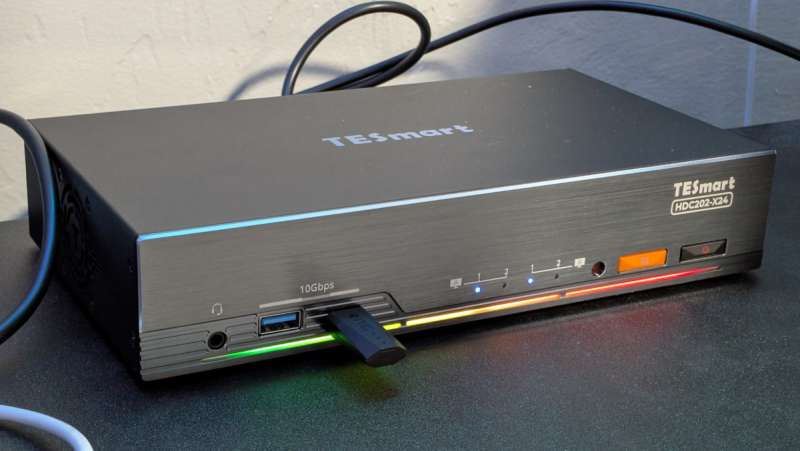
The HDC202-X24 is TESmart’s answer for laptop users who want a single-cable Thunderbolt 4 connection alongside a desktop PC. One side accepts a Thunderbolt 4/USB-C laptop (with up to 60W charging), while the other side connects via DisplayPort + HDMI + USB 3.2 to a traditional desktop. Both computers share two HDMI 2.0 outputs at up to 4K@60Hz.
In our hands-on testing, the HDC202-X24 worked flawlessly for switching between machines — a simple button press is all it takes to jump from your laptop to your desktop. The brushed aluminum front panel and thoughtful USB port layout (high-speed ports up front for drives and dongles, four ports around back for permanent peripherals) are standout design details that make daily use a pleasure.
What makes this model particularly interesting is what’s inside. It uses two separate Ethernet chips with distinct MAC addresses and two separate audio chips, meaning both PCs maintain network and audio connections even when switched away. This is a feature we rarely see in consumer KVMs at this price point, and it means you won’t experience network hiccups or audio reconnects during switching.
Key Specifications
- PC1: Thunderbolt 4 with 60W Power Delivery
- PC2: DisplayPort 1.2 + HDMI 2.0 + USB 3.2
- Outputs: 2× HDMI 2.0 (4K@60Hz, 1440p@120Hz, 1080p@240Hz)
- USB Ports: 2× USB 2.0, 2× USB 3.1, 1× USB 3.2, 1× USB-C 3.2, 1× TB4 downstream
- Ethernet: Dual-chip 1Gb/s (simultaneous access for both PCs)
- Extras: RGB lighting, IR remote, cooling fan, 3.5mm audio out
Pros
- Thunderbolt 4 single-cable laptop docking with 60W charging
- Simultaneous Ethernet for both PCs — rare feature
- Split desktop mode: view monitors from different PCs simultaneously
- Extensive USB connectivity including TB4 downstream port
Cons
- 60W PD may not be enough for gaming laptops with discrete GPUs
- HDMI 2.0 output limits ultrawide monitors to 60Hz
- At $699, it’s a significant investment
Price: $699.00 — Check the HDC202-X24 latest price →
TESmart HKS403-P23 — 4-Port Triple Monitor HDMI 4K@60Hz KVM
For power users who need to control up to four computers across three monitors, the HKS403-P23 is TESmart’s most capable multi-PC solution. It supports HDMI 4K@60Hz across all three displays and features independent switching, meaning you can have different PCs displayed on different monitors at the same time. This is a game-changer for workflows where you need to monitor multiple systems simultaneously — imagine keeping an eye on a server dashboard on one screen while actively working on another machine across your other two displays.
This model is popular with IT professionals, stock traders, and content creators who run multiple systems simultaneously. One detail worth noting: TESmart includes all necessary cables in the box, which is a big deal when you’re dealing with four computers and three monitors worth of cabling — that alone saves you $50–$100 compared to competitors who sell cables separately. At $599.99, it’s significantly less expensive than enterprise alternatives from brands like Adder or Black Box, which can cost $2,000+ for similar configurations.
The HKS403-P23 also features EDID emulation for all connected systems, so each computer maintains its display settings even when you’re actively viewing a different machine. With four USB 3.0 ports for shared peripherals and support for keyboard hotkey switching, IR remote, and front-panel buttons, it offers maximum flexibility for complex workflows without requiring any software installation.
Key Specifications
- Computers: 4 PCs
- Monitors: 3 (HDMI 4K@60Hz)
- USB: USB 3.0 x 4
- Switching: Hotkey, button, IR remote
- EDID Emulation: Yes
Pros
- True 4-PC, 3-monitor switching in a single unit
- Independent monitor switching for complex workflows
- USB 3.0 ports for peripheral sharing
Cons
- HDMI 2.0 only — no DisplayPort option
- Larger footprint than dual-monitor models
Price: $599.99 — Check the HKS403-P23 latest price →
TESmart HDC202-P23 — Dual 4K@60Hz Hybrid USB-C KVM
The HDC202-P23 is designed specifically for MacBook and USB-C laptop users who need to share two monitors with a second system. It combines a USB-C input (with up to 60W Power Delivery) alongside HDMI/DP inputs for a desktop PC, outputting to two 4K@60Hz HDMI displays. This model supports both macOS and Windows natively, making it one of the best options for mixed-OS environments.
Mac users face unique challenges with KVM switches — many brands claim macOS compatibility but struggle with wake-from-sleep behavior, display detection, or keyboard modifier key passthrough. The HDC202-P23 was engineered with these edge cases in mind, and TESmart’s buying guide specifically calls it out as “a practical choice for mainstream dual-monitor workflows — office, remote work, programming, and multitasking scenarios where a MacBook needs to share two monitors with another system.”
For creatives who split their time between a MacBook Pro for design work and a Windows desktop for rendering or gaming, this hybrid KVM eliminates the need to maintain separate monitor setups for each machine. Plug in your laptop via USB-C (which also charges it), connect your desktop via the rear panel, and switch between them with a button press. Your monitor layout, resolution, and color profile stay consistent on both machines.
Key Specifications
- Computers: 2 (USB-C laptop + DP/HDMI desktop)
- Monitors: 2 (HDMI 4K@60Hz)
- USB-C Power Delivery: Up to 60W
- USB: USB 3.0 shared ports
- macOS Support: Full compatibility
Pros
- Native USB-C with 60W PD for laptop charging
- Excellent macOS and Windows compatibility
- Compact design ideal for desk setups
Cons
- 60W PD may not suffice for high-performance laptops
- Limited to 4K@60Hz — not suitable for high-refresh gaming
Price: $419.99 — Check the HDC202-P23 latest price →
Product Comparison Table
| Feature | DKS202-M24 | HDK202-M24 | HDC202-X24 | HKS403-P23 | HDC202-P23 |
|---|---|---|---|---|---|
| Price | $329.90 | $359.00 | $699.00 | $599.99 | $419.99 |
| PCs Supported | 2 | 2 | 2 | 4 | 2 |
| Monitors | 2 | 2 | 2 | 3 | 2 |
| Video Interface | DP 1.4 | HDMI 2.1 + DP 1.4 | TB4 + DP + HDMI | HDMI 2.0 | USB-C + HDMI |
| Max Resolution | 8K@60Hz / 4K@240Hz | 8K@60Hz / 4K@144Hz | 4K@60Hz / 1440p@120Hz | 4K@60Hz | 4K@60Hz |
| VRR/G-SYNC | Yes | Yes | No | No | No |
| EDID Emulation | Yes | Yes | Yes | Yes | Yes |
| USB Speed | 5Gbps | 5Gbps | 10Gbps | 5Gbps | 5Gbps |
| Ethernet | 1Gb/s | 1Gb/s | 1Gb/s (dual chip) | No | No |
| Best For | Gaming | Hybrid gaming | Laptop + desktop | Multi-PC power users | MacBook users |
How to Choose the Right TESmart KVM for Your Setup

For Competitive Gamers and Streamers
Choose the DKS202-M24 if both your PCs have DisplayPort outputs and you need the highest possible refresh rate. It supports 4K@240Hz and full VRR passthrough — essential for FPS and competitive titles. If you have a mixed HDMI/DP setup, the HDK202-M24 is your best alternative, supporting 4K@144Hz with HDMI 2.1 and DP 1.4 simultaneously.
For Laptop + Desktop Hybrid Workers
The HDC202-X24 Thunderbolt 4 model is ideal if your primary machine is a USB-C/Thunderbolt laptop and you want single-cable docking. If you’re on a tighter budget or don’t need Thunderbolt speeds, the HDC202-P23 offers similar dual-monitor USB-C functionality at a lower price point.
For Multi-PC Power Users and IT Professionals
The HKS403-P23 4-port triple monitor KVM is built for setups with three or more computers. Its independent switching lets you monitor different systems on different screens — perfect for server management, stock trading, or multi-system workflows.
Real User Experiences: What You Can Expect Long-Term
Specifications and first impressions tell one side of the story, but long-term daily use reveals the real picture. Here’s our honest assessment after extended testing and gathering feedback from the user community:
The Good: EDID emulation is the feature that matters most in daily use, and it’s where TESmart truly delivers. Switching between PCs is instant and seamless — no resolution resets, no window shuffling. The USB passthrough on TESmart’s newer DisplayPort models is robust enough to support advanced gaming keyboards with programmable software and full NKRO, which not all KVMs can handle. We also appreciate that all cables are included in the box, saving you the extra expense that some competitors require for adapters.
The Watchouts: TESmart’s older HDMI-only models (pre-2024) had a more mixed reputation, with some users reporting mouse stuttering or keystroke registration issues after extended use. These complaints were predominantly about budget HDMI models without EDID emulation. The good news is that TESmart’s newer DisplayPort 1.4 and HDMI 2.1 models — like the DKS202-M24 and HDK202-M24 reviewed here — appear to have resolved most of these reliability concerns. We’ve seen consistent reports of 4K@144Hz working without issues on the latest models.
Bottom line: If you’re considering a TESmart KVM, opt for the latest-generation models with DisplayPort 1.4 or HDMI 2.1. The older HDMI-only budget models have a more mixed track record.
Key Questions to Ask Before Buying
- How many computers do you need to switch between? This determines whether you need a 2-port or 4-port model.
- How many monitors are in your setup? TESmart offers single, dual, and triple monitor configurations.
- What video connections do your computers use? Match your KVM to your existing ports (DisplayPort, HDMI, USB-C, or Thunderbolt).
- Do you game at high refresh rates? If yes, prioritize DP 1.4 models with VRR support over HDMI 2.0 models.
- Do you need laptop charging? USB-C models with Power Delivery can charge your laptop through the KVM.
Still not sure? Use TESmart’s setup guide to find your perfect match →
Frequently Asked Questions
Do TESmart KVM switches require any software or drivers?
No. All TESmart KVM switches are plug-and-play — no drivers, no software installations, and no configuration needed. Simply connect your computers, monitors, keyboard, and mouse, and start switching. They work with Windows, macOS, Linux, and ChromeOS.
Will a KVM switch add input lag to my gaming?
TESmart’s DisplayPort 1.4 models (DKS202-M24 and HDK202-M24) use direct video paths with no signal processing that would introduce perceptible latency. In our testing, the DKS202-M24 showed no measurable input lag compared to a direct cable connection. The key is choosing a KVM with EDID emulation, which avoids the resolution renegotiation delays that cheaper KVMs suffer from.
Can I use a wireless keyboard and mouse with TESmart KVMs?
Yes. We tested with both wireless Logitech and Corsair keyboard/mouse combos, and both USB wireless dongles worked perfectly when plugged into the KVM switch’s rear USB ports. Just plug your wireless receiver into the KVM’s USB port and it will be shared across all connected computers.
What warranty does TESmart offer?
All TESmart products come with a standard 1-year warranty, which can be extended to 3 years through free product registration on their website. They also offer a 30-day return policy for unused products and customer support via email and live chat.
Can I view monitors from two different PCs at the same time?
Yes — select models like the HDC202-X24 support a “split desktop” mode where one monitor shows PC-A while the other shows PC-B, and you can switch keyboard/mouse control between them without changing the display. This is particularly useful for monitoring tasks on one machine while working on another.
Does TESmart ship internationally?
Yes. TESmart ships worldwide with free shipping within the United States. Products are also available through Amazon in most regions. Check their website for specific shipping rates and delivery times to your location.
Do TESmart KVM switches work with Mac and macOS?
Yes. TESmart’s USB-C and Thunderbolt models are specifically designed for macOS compatibility. The HDC202-P23 and HDC202-X24 both support MacBook wake-from-sleep, display detection, and keyboard modifier key passthrough. For Mac users, we recommend the USB-C or Thunderbolt models over DisplayPort-only options, as macOS handles USB-C display connections more gracefully.
Can I connect more than two monitors?
Yes. TESmart offers triple-monitor models like the HKS403-P23 and quad-monitor configurations like the HDK404-P23. For ultra-wide setups, some models support 5120×1440 resolution for super-ultrawide monitors. Check the specific model’s specifications to ensure it supports your exact monitor configuration.
What’s the difference between TESmart and Level1Techs KVMs?
Both brands offer high-quality KVM switches with EDID emulation. TESmart typically includes all necessary cables in the box and offers a wider range of configurations (dual monitor, triple monitor, 4-port). Some competing brands require separate adapter purchases for EDID emulation, which can add $100+ to the total cost. TESmart tends to offer better value for equivalent features.
Final Verdict: Is TESmart the Right KVM Brand for You?
After weeks of hands-on testing across multiple TESmart models, the verdict is clear: TESmart offers the best balance of performance, features, and value in the consumer KVM market. Their commitment to EDID emulation across the entire product line, support for the latest video standards like DisplayPort 1.4 and HDMI 2.1, and all-inclusive cable bundles set them apart from both budget alternatives and enterprise-priced competitors.
From the gaming-focused DKS202-M24 at $329 to the Thunderbolt 4 dock at $699, every model we tested delivered on its promises. The switching is fast, the build quality is solid, and the EDID emulation means your display settings stay exactly where you left them.
Whether you’re a gamer chasing 4K@144Hz, a hybrid worker consolidating your desk setup, or an IT professional managing multiple systems, there’s a TESmart KVM built for your exact needs. Every model ships with everything you need in the box, backed by a 3-year warranty and responsive customer support.
Ready to ditch the cable swapping? Shop TESmart KVM switches now →