








Affiliate disclosure: This article contains affiliate links. If you buy through them, we may earn a commission at no extra cost to you.
A useful security camera should answer practical questions: who approached the house, what happened beside the car, and whether a delivery reached the doorstep. Our view is that eufy Security is especially appealing to homeowners who want detailed video and local recording without a mandatory cloud subscription for those core features. The challenge is choosing the right camera from a lineup with overlapping names and very different power requirements.
In this eufy Security review, we focus on six cameras and doorbells for everyday home protection. We care most about useful outdoor coverage, nighttime detail, package visibility, and storage that fits the household. Our approach is to choose the view and recording mode first, then decide which extra features deserve the money. We also weigh installation effort, because a camera is only useful when it can watch the right place. Product information was checked in September 2026; offers and software features can change.

Explore current eufy Security cameras and offers →
Our Quick Verdict: Which eufy Security Camera Should You Choose?
We would start with the location you need to protect, then decide how much installation work you can accept. A solar camera is attractive beside a sunny driveway; a wired floodlight makes more sense when you want a continuous timeline outside a garage. Spending more on resolution will not solve an unsuitable mounting position.
- For a wide driveway: eufyCam S4 combines a fixed overview with a moving close-up camera.
- For low-light outdoor coverage: eufyCam S3 Pro puts the emphasis on 4K imaging and MaxColor Vision.
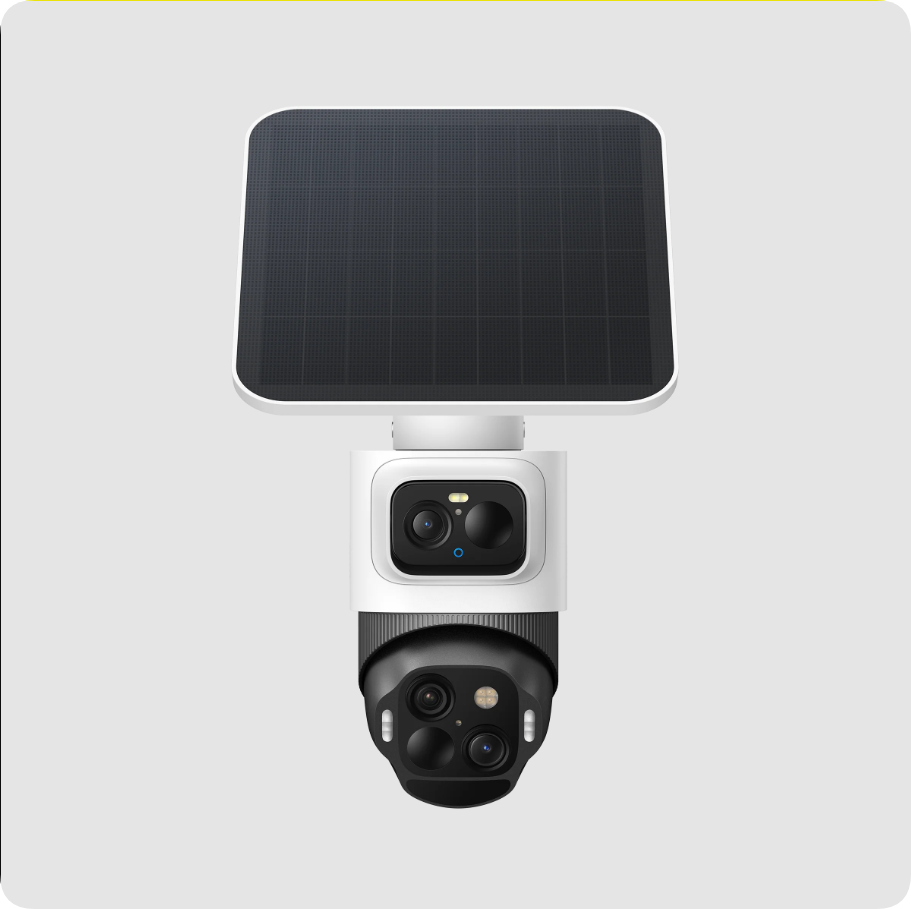
- For a flexible solar installation: SoloCam S340 offers dual lenses and motorized coverage without requiring a hub.
- For a garage with existing electrical wiring: Floodlight Camera E340 combines lighting with continuous recording capability.
- For visitors and deliveries: Video Doorbell E340 shows the person at the door and the package area below.
- For indoor monitoring: Indoor Cam S350 provides a detailed room view with pan, tilt and zoom.
Why We Would Consider eufy Security
Local storage gives the system a clear long-term appeal. Depending on the camera, recordings live in built-in memory, on a microSD card or on a compatible HomeBase. We like being able to budget for storage as hardware instead of assuming every additional camera creates another recurring bill. Optional cloud services and other paid features still need separate consideration.
The range addresses distinct jobs. A doorbell can cover packages at your feet; a floodlight can illuminate a dark approach; a fixed camera can keep a critical entrance in view. We would build a small combination around those jobs instead of buying identical cameras for every wall.
Dual lenses can make a wide view more useful. Seeing the entire yard and inspecting a person within it are different tasks. Several models provide wide and telephoto perspectives, although advertised hybrid zoom should not be confused with equivalent optical magnification.
The main trade-off is setup complexity. Camera names, hubs, recording modes and firmware support require attention. We would also allow time to adjust activity zones and alerts after installation. A system that sends too many notifications is easy to start ignoring.
1. eufyCam S4: Our Pick for Wide Driveways and Active Tracking

We find the S4 especially interesting when you want a camera to keep watching an entrance while also following movement elsewhere in the scene. Its upper camera holds a fixed overview, while the lower motorized module can turn toward activity. That design addresses a practical weakness of a single moving camera: following one subject can leave its original view unattended.
- Imaging: 4K fixed camera plus two 2K lenses in the moving module.
- Coverage: 130° fixed view, motorized panoramic coverage and up to 8× hybrid zoom.
- Power: rechargeable battery with detachable 5.5W solar panel; direct power for continuous recording.
- Storage: 32GB built in, with microSD expansion up to 256GB; HomeBase S380 support.
We would consider it for a driveway where one person might approach the door while another walks past a parked vehicle. Having both context and a closer perspective can help explain an event. It is still one installation point, however, so it cannot see around a solid corner or through a parked van. A second camera may provide more useful coverage than additional zoom.
The detachable panel also gives you more freedom to prioritize the camera angle and sun exposure separately. We would check how shadows move across the intended panel position before mounting anything permanently. Seasonal sunlight, frequent triggers and time spent in live view all affect charging needs.
Our reservations concern size, configuration and expectations. The S4 is a substantial camera, and its two views mean more settings to consider. We would test saved recordings in the selected viewing mode rather than assume every simultaneous stream retains the headline resolution. Live-view responsiveness also depends on the network and configuration.
Pros: overview plus tracking, flexible solar placement, useful standalone storage. Cons: conspicuous hardware, more setup decisions, and continuous recording requires direct power plus suitable storage and firmware.
Our recommendation: choose the S4 when active tracking solves a real coverage problem. For one narrow passage, a simpler fixed camera may be the more sensible purchase.
Check eufyCam S4 options and current pricing →
2. eufyCam S3 Pro: Our Pick for Low-Light Outdoor Detail

The S3 Pro remains worth considering alongside the S4 because it serves a different priority. We would put it on the shortlist when the important view is fixed and nighttime image quality matters more than following a subject with a motorized camera. A side entrance, gate or defined approach to the house is a natural example.
- Resolution: 4K with a fixed 135° field of view.
- Low-light hardware: 1/1.8-inch sensor and f/1.0 lens with MaxColor Vision processing.
- Detection: radar and passive infrared sensing.
- Power and storage: solar-assisted battery operation with HomeBase-based recording.
Color can help distinguish clothing, vehicles and other details that look similar in monochrome. The S3 Pro offers low-light color imaging alongside spotlight and infrared options. We would still judge it by moving subjects at the actual installation distance. A bright stationary night image is not a guarantee of a sharp face when someone walks quickly across the frame.
We also like the logic of placing storage inside the home rather than relying only on memory in an exposed camera. HomeBase S380 provides 16GB built-in storage and supports an additional drive up to 16TB. The practical retention period depends on recording settings, activity and camera count; the maximum capacity is not included automatically.
The fixed view is both a strength and a limitation. It keeps attention on the chosen entrance, but anything outside the frame needs another camera. We would not replace two carefully positioned cameras with one S3 Pro simply because it records in 4K. Distance and angle still determine how much useful detail reaches the sensor.
Pros: strong low-light focus, fixed coverage of a priority area, expandable indoor storage. Cons: no motorized tracking, a hub-based setup to budget for, and solar performance depends on placement.
Our recommendation: consider the S3 Pro for a defined outdoor view where nighttime detail is the deciding factor. If you want continuous recording, verify the current wired-mode requirements for the exact regional model, firmware and storage setup before buying.
Explore eufyCam S3 Pro cameras and kits →
3. SoloCam S340: Our Pick for a Straightforward Solar Camera

The SoloCam S340 is where we would begin for someone adding one camera to a yard without nearby mains power. It combines a wide view, a closer perspective and motorized movement in a standalone device. You can expand into a larger compatible system later instead of making a hub purchase the first decision.
- Imaging: 3K wide-angle camera and 2K telephoto camera.
- Movement: 360° pan and 70° tilt, with up to 8× hybrid zoom.
- Power: built-in rechargeable battery and included detachable solar panel.
- Storage: 8GB built in; optional HomeBase S380 connection.
- Recording: event-based; no 24/7 continuous recording.
We particularly like the option to put the panel somewhere sunnier than the camera itself. A sheltered camera position may offer a better angle on an approach, while the nearby panel receives clearer light. Before buying, measure the route between those locations and compare it with the supplied cable length.
The combination makes sense for checking a side yard, garden access or the area beside a garage. It is less suitable when you need an uninterrupted record of everything that happens overnight. Adding a HomeBase increases storage and supported features, but it does not turn the S340 into a continuous-recording camera.
Our other practical concern is detection setup. A camera facing vegetation or passing traffic needs more careful tuning than one watching a quiet gate. We would start with a focused activity zone and then walk the expected approach several times. Check whether clips begin early enough and whether the camera returns to the useful default position afterward.
Pros: solar panel included, useful dual perspectives, no mandatory hub. Cons: limited built-in storage, no continuous timeline, and the battery is not removable for a quick swap.
Our recommendation: buy the S340 for convenient event monitoring where solar charging is practical. If your main concern is reviewing moments that never triggered an alert, choose a model designed for continuous recording instead.
Check SoloCam S340 cameras and bundles →
4. Floodlight Camera E340: Our Pick for Garages and Dark Approaches

The Floodlight Camera E340 is the model we would consider when an exterior light already occupies the right surveillance position. It combines illumination, a moving camera and the option of continuous recording. For a dark driveway, that can be a more complete solution than mounting a small battery camera beside an inadequate light.
- Imaging: 3K wide-angle and 2K telephoto cameras.
- Lighting: up to 2,000 lumens with adjustable illumination.
- Coverage: motorized pan-and-tilt viewing.
- Connectivity: dual-band Wi-Fi 6.
- Recording: 24/7 capability with microSD storage up to 128GB or a supported HomeBase setup.
Our main reason to choose it is the recording model. With continuous footage, you can review the lead-up to an incident even if the motion alert does not describe the whole story. That is valuable beside a vehicle or an entrance where context matters. You still need to enable the appropriate mode and provide enough storage.
The light is useful beyond video. It can make an approach easier to navigate and provide visible illumination when someone arrives. We would aim the panels deliberately and adjust brightness and triggers so ordinary activity does not create a nuisance for the household or nearby windows.
Installation is the biggest qualification. This is a hardwired fixture, so it needs suitable electrical wiring at the mounting point. Include professional installation in the budget if necessary. Also check that the existing light position gives the camera a useful view; a convenient junction box can still be too high or poorly angled for identifying visitors.
Pros: lighting and surveillance together, continuous recording option, flexible views. Cons: mains installation, noticeable size, and storage capacity needs planning for an always-on timeline.
Our recommendation: prioritize the Floodlight E340 for a garage or back approach where reliable power is available. It is a particularly sensible choice when replacing an existing light also improves the camera position.
View Floodlight Camera E340 pricing and specifications →
5. Video Doorbell E340: Our Pick for Visitors and Packages

What we like about the Video Doorbell E340 is how it addresses a specific frustration: a camera can show a visitor clearly while missing the parcel below them. Its front-facing view covers the person, while a downward-facing camera watches the doorstep. We find that division more useful for deliveries than simply stretching a conventional single-camera view.
- Video: 2K main view with a second downward-facing camera.
- Night viewing: color night vision with integrated lighting.
- Storage: 8GB built-in local memory.
- Power: removable battery with a supported wired installation option.
- Wi-Fi: 2.4GHz; optional compatible HomeBase and chime configurations.
For a home receiving frequent deliveries, the useful question is whether the package remains visible after the visitor leaves. We would preview the lower camera at the actual mounting height before drilling. A deep step, side-positioned parcel box or railing can change the result significantly.
Two-way audio also matters because a doorbell is something you interact with, not just a recorder. We would check the complete experience from a phone on mobile data: receiving a notification, opening the live feed and speaking to someone outside. Strong video specifications alone do not tell you how quickly that conversation begins.
One detail deserves special attention: the battery must remain installed even in wired mode. Wiring should not be interpreted as turning the E340 into a different, continuously recording doorbell. It is also important to check chime compatibility rather than assume an older eufy chime will work.
Pros: dedicated package view, local storage included, flexible installation. Cons: no 5GHz Wi-Fi or Apple HomeKit support, battery access still matters, and remote responsiveness depends on connectivity.
Our recommendation: choose it when the front door and delivery area are your main concern. Pair it with a separate outdoor camera if you also want to understand what happens farther along the driveway.
Check Video Doorbell E340 and compatible bundles →
6. Indoor Cam S350: Our Pick for Flexible Room Coverage

We would shortlist the Indoor Cam S350 when a fixed indoor camera would leave you choosing between a useful overview and a closer look across the room. Its dual lenses and motorized movement offer more flexibility for a larger living space, a hallway intersection or checking on a pet while you are away.
- Imaging: 4K wide-angle camera and 2K telephoto camera.
- Zoom: 3× optical and up to 8× hybrid zoom.
- Movement: 355° horizontal pan and 75° vertical tilt.
- Connectivity: dual-band Wi-Fi 6.
- Storage: microSD up to 128GB or compatible HomeBase 3 storage; continuous recording support.
We would choose its position around the view you need most often, rather than rely on constant manual panning. A clear default angle toward the relevant doorway makes quick checks simpler. Preset positions can then provide alternative views without repeatedly steering the camera from scratch.
Privacy mode is an especially useful part of an indoor camera. On this model, it turns toward a designated position and stops recording. We would make the household’s expectations clear and select a location that avoids unnecessarily capturing private areas. Convenient monitoring works better when everyone understands when it is active.
Pet and person recognition should be treated as notification aids, not guarantees that every event receives the right label. During setup, compare alerts against saved video and adjust settings to suit the room. A camera that reliably shows the scene is still useful even when automated descriptions need refinement.
Pros: detailed room view, optical close-up capability, local recording and privacy mode. Cons: requires outlet power, no Apple HomeKit support, and a 128GB card may offer limited retention at high recording quality.
Our recommendation: consider the S350 for larger indoor spaces where a second perspective helps. For a single small doorway, weigh whether you actually need its additional lens and movement before spending more.
Explore Indoor Cam S350 options →
eufy Security Camera Comparison
| Model | Best fit | Main resolution | Power | Key consideration |
|---|---|---|---|---|
| eufyCam S4 | Wide driveways | 4K + dual 2K | Battery/solar or direct power | Continuous recording needs direct power and suitable storage |
| eufyCam S3 Pro | Low-light fixed views | 4K | Battery/solar; wired-mode option | Plan for HomeBase and verify wired-mode requirements |
| SoloCam S340 | Standalone yard monitoring | 3K + 2K | Battery/solar | Event recording only |
| Floodlight E340 | Garages and dark approaches | 3K + 2K | Hardwired mains | Electrical installation and storage required |
| Doorbell E340 | Visitors and packages | 2K main view | Battery; wiring option | Battery remains installed when wired |
| Indoor S350 | Rooms and hallways | 4K + 2K | Plug-in | Indoor use; storage purchased as needed |
Compare the exact contents of each offer: a single camera, two-camera pack and HomeBase bundle are different purchases. We would check the current checkout total, included storage and installation cost rather than rank models by temporary sale percentages.
HomeBase, Subscriptions and Privacy: What You Actually Need
HomeBase S380, also called HomeBase 3, can centralize recordings and add supported recognition features. Its 16GB built-in memory can be expanded with a compatible drive up to 16TB. We would consider it most strongly when building a system with multiple compatible cameras or wanting recordings stored away from the outdoor hardware.
It is not automatically necessary for every camera. The S4, S340 and Doorbell E340 have built-in storage, while the S350 and Floodlight E340 can use microSD. Starting with one standalone device may be more economical than purchasing a hub before you know your coverage needs.
We check compatibility model by model, particularly when a purchase includes newer HomeBase hardware. Our priority is the combination that supports the recording and recognition features you actually need. Before ordering, confirm the specific camera, hub generation and firmware support for the feature you need. Do not assume that every device carrying the eufy name works identically with every base station.
We also distinguish no mandatory subscription for supported local recording from an entirely cloud-free experience. Optional cloud backup, thumbnail notifications and other services can use cloud infrastructure, and some extras have charges. Remote access also needs connectivity. Choose settings based on the functions you actually intend to use.
Our practical approach is to keep firmware current, protect the account, limit shared access and export important clips promptly. Local storage has a useful place in a security setup, but it still needs thoughtful management. A recording that has been overwritten cannot help explain an older incident.
How We Would Build a Sensible eufy Setup
Start with the most important approach
Draw a simple plan of the house and mark where someone can enter the property. Choose the view that would answer your biggest concern first. If that is deliveries, start with the doorbell. If it is a vehicle beside the house, start with a driveway or floodlight camera. Add coverage only when another location answers a different question.
Choose the recording mode before the camera
Event clips are convenient for reviewing visits and reducing storage use. A continuous timeline is more useful when you want to examine periods that did not trigger a notification. This decision affects power, storage and model selection. Solar charging alone does not establish that a camera records continuously.
Match the mounting position to the job
Hold the camera near the intended position and inspect the view before fixing it permanently. Check faces approaching the door, the area beneath the camera and obstructions at the edge of the frame. Repeat after dark. We would rather improve a poor angle than assume additional pixels or maximum zoom will compensate.
Budget for the complete installation
Include memory cards, a HomeBase drive if needed, cable routing and any electrical work. For solar models, consider future access for cleaning the panel or charging during unfavorable weather. For a doorbell, confirm mounting clearance and the chime arrangement. A discounted bundle is only good value if its contents match the plan.
Check playback as carefully as alerts
Walk through the monitored area, open the resulting clips and verify the part you care about is visible. Try live view from outside the home network. Adjust sensitivity gradually, keeping a clear default view for moving cameras. This small setup exercise gives you more useful information than a long list of enabled features.
Frequently Asked Questions
Do eufy Security cameras require a subscription?
The models discussed offer supported local recording without a mandatory cloud-storage subscription. Storage hardware and optional services may cost extra. Check the specific feature rather than assuming every AI, backup or membership option is included.
Can a solar eufy camera record all day?
Solar charging and continuous recording are different capabilities. The S340 records events rather than a continuous timeline. The S4 supports continuous recording with direct power, appropriate storage and supported firmware. Match the exact model and configuration to your requirements.
Is HomeBase required for every camera?
No. Several models can work independently with built-in memory or microSD storage. The S3 Pro is a hub-based choice, while HomeBase can be an optional expansion for other compatible models. Confirm compatibility before mixing devices.
What is the difference between the two E340 products?
The Video Doorbell E340 is for visitors and packages at the front door. The Floodlight Camera E340 is a hardwired outdoor camera with lighting and continuous-recording capability. Their shared E340 name does not mean they have the same installation or recording features.
Are these cameras compatible with Apple HomeKit?
Support varies. The S3 Pro is the relevant Apple Home option in this selection, subject to its supported setup and platform limitations. The S4, Doorbell E340 and Indoor S350 should not be purchased expecting HomeKit support. Verify the exact model before ordering.
Which model would we buy first?
For one sunny outdoor position, we would shortlist the S340. For tracking across a broad driveway, consider the S4. For nighttime fixed coverage, examine the S3 Pro. If packages or continuous garage recording are the priority, start with the corresponding E340 instead.
Final Verdict: Buy for the View You Need
eufy Security offers a compelling way to build home surveillance around local recording and a choice of camera designs. Our strongest recommendation is to select by location, power and recording needs. The S4, S3 Pro and S340 offer different approaches to outdoor coverage, while the two E340 products and Indoor S350 solve more specific household tasks.
Start with the device that answers your most important question, verify the view and saved footage, and expand from there. That is a more useful investment than buying the biggest bundle before deciding what each camera will actually watch.